Category: Fortnite

  • Fortnite Override Cheat Codes

    Fortnite Override Cheat Codes

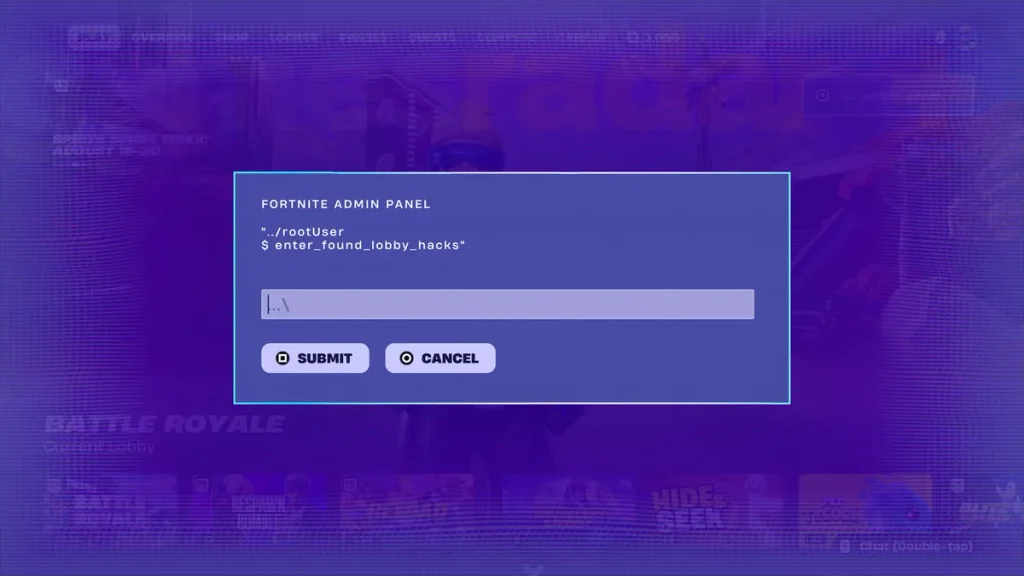
    Fortnite Chapter 7 Season 4: Override added a hidden Admin Panel to the Battle Royale lobby, and typing the right cheat code into it hands you free rewards instantly — no grinding required. Codes can unlock Sprite Dust, XP, Gizmos, Cheat Master Sprites, loading screens, and a few just-for-fun lobby transformations tied to the season’s gaming crossovers like Sonic and Persona 5.

    This list is checked and refreshed regularly. Last updated: September 7, 2026.

    All Working Fortnite Override Cheat Codes

    CodeRewardStatus
    whereisthedustytree5,000 Sprite Dust✅ Working (New)
    BRBTransforms you into a toilet✅ Working
    InsertCoinToContinueTransforms you into an arcade machine✅ Working
    InvalidCheat2x Cheat Code Locator✅ Working
    ChatWhereDoYouFindTheKey2x Extraction Accelerator✅ Working
    JONESYISGOLDENGold Jonesy Sprite✅ Working
    GatherAndCraftCheat Master Bush Sprite (requires Story quest progress)✅ Working
    H0p0nVC2,000 Sprite Dust✅ Working
    YourThoughtsAreMine5,000 Sprite Dust (requires Geno Story quest progress)✅ Working
    O2OverrideLlama Supply Drop + Portable Extractor✅ Working
    TakeYourHeart2x Extraction Accelerator✅ Working
    PerfectOrder4x Spicy Taco✅ Working
    SurviveTheNight2x Cheat Code Extractor✅ Working
    FindItChat2x Cheat Code Locator✅ Working
    Play4AllCheat Master Jonesy Sprite✅ Working
    Born2PlayCheat Master Adventure Sprite✅ Working
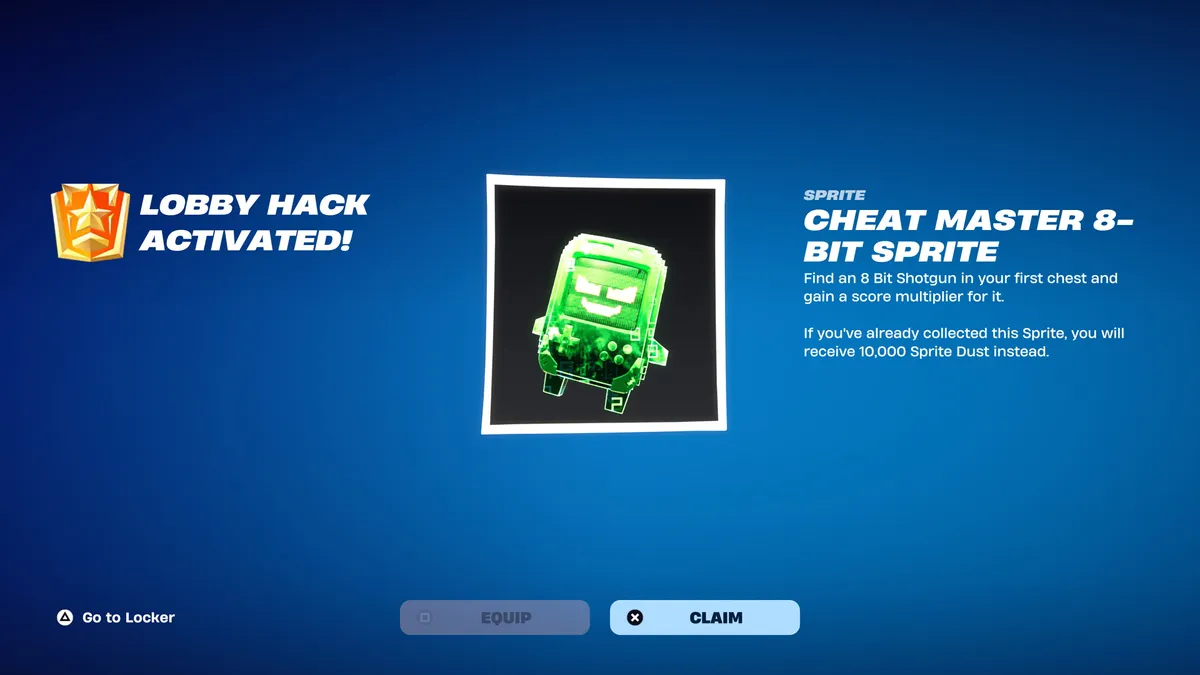
    8BitBlastCheat Master 8-Bit Sprite✅ Working
    IWannaFlyHighCheat Master Tails Sprite✅ Working
    GottaGoFastCheat Master Sonic Sprite✅ Working
    Perlimpinpin2,000 Sprite Dust✅ Working
    Magilume2,000 Sprite Dust✅ Working
    Chispambo2,000 Sprite Dust✅ Working
    Abgestaubt2,000 Sprite Dust✅ Working
    OverrideXP40,000 XP✅ Working
    BeMoreAlienOverride Ready loading screen✅ Working
    ReachYourImpossibleBlock Party loading screen✅ Working
    LetsBlockAndRollTurns you into a Tetris block (lobby effect)✅ Working
    DontBlockMeReverts the Tetris block effect✅ Working

    Codes are case-sensitive — type them exactly as shown, capital letters and numbers included.

    How We Verify Fortnite Override Cheat Codes

    Every code on this list is entered manually into the Admin Panel before publishing to confirm it still triggers a reward. We pull new codes as Epic shares them through official channels and the ongoing Override ARG, then re-test the full list on a regular schedule so codes that stop working get flagged fast. Any code that fails during a check gets moved to the expired section below rather than staying mixed in with the active list.

    How to Redeem Fortnite Override Cheat Codes

    1. Launch Fortnite and let your lobby fully load.
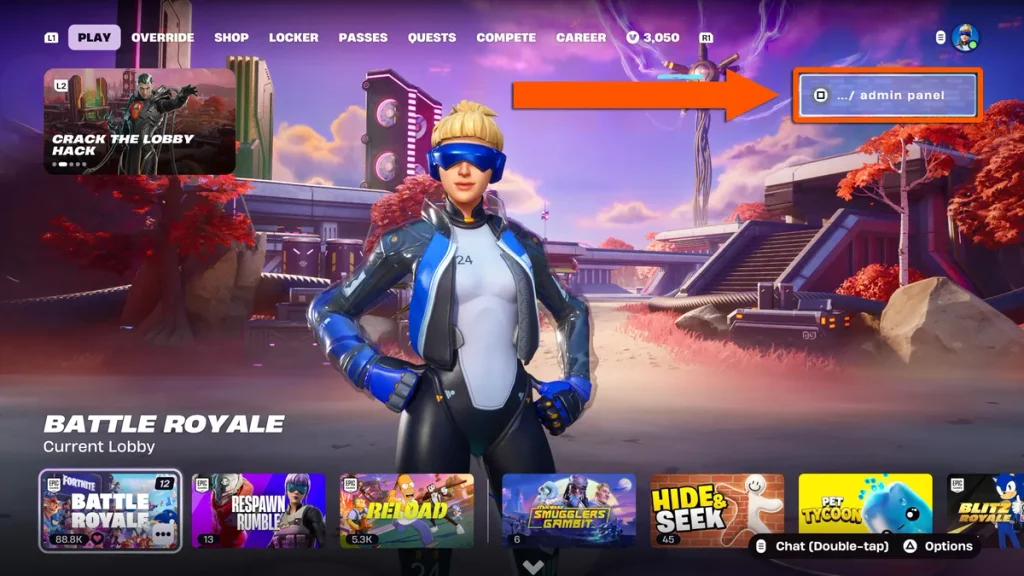
    2. Look for the Admin Panel prompt in the top-right corner of the lobby screen.
    3. Interact with it to open the Admin Panel terminal.
    4. Type the code into the input field exactly as it appears above — codes are case-sensitive.
    5. Select Submit to activate it.
    6. A “Lobby Hack Activated!” confirmation will appear — claim or equip your reward from there.

    Where to Enter Fortnite Override Cheat Codes

    You don’t need to load into a match. The code-entry panel lives in the main Battle Royale lobby — look for the small Admin Panel icon or prompt in the top-right corner of the screen (or the equivalent button prompt if you’re on console). That’s the only place Lobby Hack codes work; codes found scattered across the Island during a match are a separate mechanic tied to freeing Sprite allies, not the Admin Panel.

    Expired Fortnite Override Cheat Codes

    None of the codes above have expired yet — Epic hasn’t disabled any Lobby Hack codes so far this season. As soon as a code stops working, it’ll be moved here and removed from the active table so you don’t waste time on it.

    Why Are My Fortnite Override Cheat Codes Not Working?

    If a code won’t redeem, it’s almost always one of these:

    • Typing error — codes are case-sensitive, so double-check capitalization and spacing against the list exactly.
    • Already used — most codes are one-time redemptions per account; if you’ve claimed it before, it won’t trigger again.
    • Expired code — Epic can disable codes without warning. Check the expired list before assuming it’s a typo.
    • Locked behind a quest — a few codes (like GatherAndCraft and YourThoughtsAreMine) only unlock after you’ve progressed specific Story quests.
    • Server issues — Fortnite’s servers occasionally lag during high-traffic periods; wait a few minutes and try again before assuming the code is dead.

    SEO notes: Primary keyword “Fortnite Override cheat codes” is placed in the H1, first paragraph, and multiple subheadings. Consider linking internally to related code pages (Sprites guide, other Fortnite code lists) and externally to Epic’s official Fortnite channels for authority. Suggested alt text for a hero image: “Fortnite Override Admin Panel screen showing cheat code entry field.”

    Next steps: Update the code table and “last updated” date each time you re-verify. Consider pairing with a screenshot of the Admin Panel for the redemption steps.
  • Fortnite Chapter 7 Season 4 Guide: How to Complete All Geno Story Quests

    Fortnite Chapter 7 Season 4 Guide: How to Complete All Geno Story Quests

    Geno is tearing the island apart in Fortnite Chapter 7 Season 4, and the “Geno: The Ultimate Reality” story quests are how you follow his plan and earn a full set of Void-themed rewards. There are eight quests in the main line, separate from the Weekly Quests, and you can chip away at them across normal Battle Royale matches. Most players finish the full set in roughly 45 minutes to an hour of play, and progress carries over between matches — you never need to complete a quest in a single game.

    This guide covers every step, where to find what you need, and how to unlock the bonus Void Master Geno style once you’re done.

    How to Start the Geno Story Quests in Fortnite

    The questline kicks off with a hidden objective that only shows up in your quest log as “???.” You don’t need to be wearing any particular skin — the Geno outfit isn’t required, and any cosmetic works for this step.

    To trigger it, you simply need to eliminate other players. Progress builds in batches (two, then four, then six), but it all stacks toward one requirement: six total eliminations. Only eliminating other players counts here — NPCs and bosses don’t contribute to this particular objective. Landing at an extraction site or an Override Console is a good way to find fights quickly, since both locations tend to draw other players.

    Once you hit six eliminations, the rest of the “Geno: The Ultimate Reality” series unlocks.

    All Geno Story Quests and Objectives

    Here’s the full quest list at a glance:

    1. Eliminate 6 enemy players (hidden opener)
    2. Talk to The Innovation, Jones, and The Order about Geno
    3. Find Geno’s memories from his past
    4. Visit an Override Console to inspect Geno’s work
    5. Activate an Override Console
    6. Extract 3 Sprites so Geno can distill their essence
    7. Collect 8 Looper’s Essence from eliminated players
    8. Take down Geno and defy his commands to save The Order

    Each quest unlocks the next in sequence, so you’ll need to work through them in order rather than skipping around.

    Geno Story Quests 1–3: Eliminations, NPCs, and Memory Locations

    Quest 1 — Eliminations: As covered above, this is the hidden “???” objective. Get six eliminations across any number of matches to unlock the rest of the series.

    Quest 2 — Talk to the NPCs: You’ll need to visit three named characters and choose the “Ask about Geno” dialogue option with each one:

    • The Innovation — Latte Landing
    • Jones — north of Golden Grove
    • The Order — Chopped Shop, or south of Reality’s Reign

    Quest 3 — Find Geno’s memories: These appear as glowing blue orbs scattered around the map. Confirmed spawn areas include:

    • The Battlewoods
    • The Mega Maze entrance near Sunken Shores
    • Shaken Sanctuary

    You don’t need to collect every orb — just enough to satisfy the quest tracker.

    Geno Story Quests 4–6: Override Consoles and Sprite Extraction

    Quest 4 — Visit an Override Console: There are eight Override Consoles scattered across the map. Simply visiting one satisfies this step — it doesn’t need to be active yet.

    Quest 5 — Activate an Override Console: This time you need to actually power one up. A strong strategy is dropping center-map and gliding above the purple tornado to reach a console early, before other squads get there first.

    Quest 6 — Extract 3 Sprites: Use portable extractors (or map cheat codes, where available) at extraction sites to pull Sprites. This can be spread across multiple matches, so there’s no need to rush all three in one game.

    One important warning: if you’re carrying a Cheat Master Sprite in your inventory, avoid engaging Geno directly in combat. He can eliminate you instantly, and you’ll lose the Sprite in the process.

    Geno Story Quests 7–8: Looper’s Essence and the Geno Fight

    Quest 7 — Collect 8 Looper’s Essence: This drops from eliminated players as red orbs. Walk over a downed or eliminated opponent’s essence drop to pick it up, and use it to power the next-stage Override Console. You’ll need eight total, and — like the elimination quest — this can be built up gradually across matches.

    Quest 8 — Take down Geno: This is the final confrontation, and it comes with a twist: you don’t actually need to defeat him. Approaching Geno during this encounter will get you eliminated almost immediately, and that’s by design. Once you’re eliminated, queue into a new match and simply land anywhere on the island — the quest will register as complete as soon as you drop in.

    Rewards for Completing the Geno Story Quests

    Finishing all eight quests unlocks pieces of the Reality’s Reign reward set, along with unique Geno-themed voicelines and cosmetic extras tied to the storyline. Completing the full series is also the only way to access the bonus reward below.

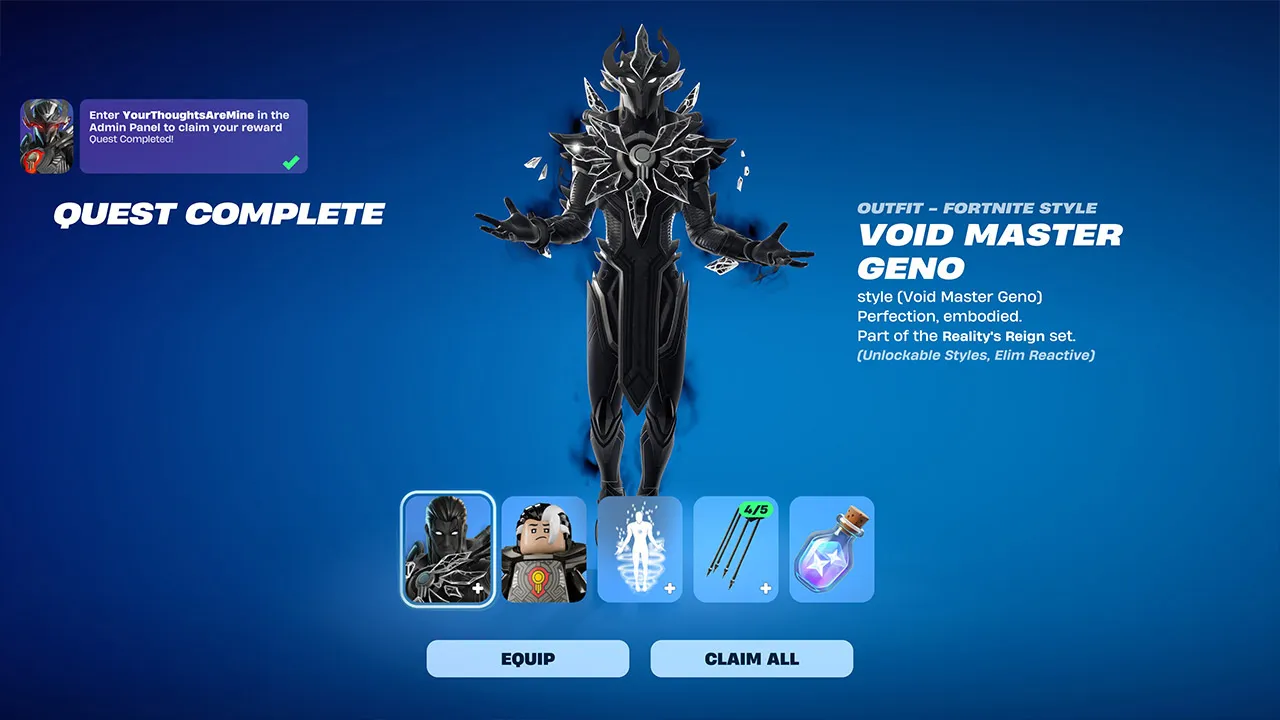
    Geno Story Quests Reward: How to Unlock the Void Master Geno Style

    Once all eight main quests are complete, a secret ninth objective appears. To claim it:

    1. Open the in-game Admin Panel.
    2. Enter the code YourThoughtsAreMine.
    3. Apply the code to unlock the remaining pieces of the Reality’s Reign set — including the Void Master Geno outfit style.

    This code only becomes available after you’ve finished the full questline, so there’s no way to unlock the style early.

    Hidden Geno Story Quests and Bonus XP

    Beyond the main eight-quest storyline, there are several hidden Geno quests that don’t show up in your tracker automatically. They don’t award cosmetic items, but completing them unlocks additional audio logs that expand on what Geno is up to, plus bonus XP. Confirmed hidden objectives include:

    • Activate 10 Match Overrides or Cheat Codes
    • Survive 10 Storm Phases

    These are worth chasing if you’re already grinding matches for XP, since they layer on top of your normal quest progress at no extra cost.

    Best Tips to Complete the Geno Story Quests Faster

    • Prioritize elimination-based quests first. Steps 1 and 7 both depend on player eliminations or essence drops from eliminations, so landing in high-traffic areas early knocks out two requirements at once.
    • Drop near Override Consoles. With eight consoles on the map, you’re never too far from one — and they matter for three separate quests (4, 5, and 6).
    • Don’t fight Geno seriously. For the final quest, engaging and dying is the intended path. Trying to actually win the fight wastes time and risks losing a Cheat Master Sprite if you’re carrying one.
    • Spread quests across matches. Nearly every step tracks progress across games, so there’s no need to force everything into one run. Play normally and let the tracker fill in naturally.
    • Save the Admin Panel code for last. YourThoughtsAreMine only unlocks after all eight quests are done, so there’s no benefit to hunting for it early.

    Geno Story Quests FAQ

    How many Geno Story Quests are there? Eight main quests, plus a secret ninth step tied to redeeming the Void Master Geno code, and several optional hidden quests for bonus XP.

    Do I need the Geno skin equipped to start the quests? No. Any cosmetic works for the opening elimination quest and the rest of the series.

    Do I have to defeat Geno to finish the questline? No — you just need to engage him and get eliminated, then load into a new match and land on the island to complete the final quest.

    How long does it take to finish the full questline? Roughly 45 minutes to an hour of normal Battle Royale play, spread across multiple matches.

    What do I get for finishing all the quests? Pieces of the Reality’s Reign reward set, Geno-themed voicelines, and access to the Admin Panel code that unlocks the Void Master Geno style.

  • Fortnite Admin Panel Codes and How to Use Lobby Hacks

    Fortnite Admin Panel Codes and How to Use Lobby Hacks

    If you’ve spotted a mysterious “…/ admin panel” tab in the corner of your Fortnite lobby and wondered what it does, you’re looking at one of Chapter 7 Season 4’s best freebie systems. Fortnite admin panel codes unlock free XP, Sprite Dust, rare Cheat Master Sprites, and fun lobby transformations — no purchase required. Here’s the full rundown of working codes, how to redeem them, and what to do if they stop working.

    All Working Fortnite Admin Panel Codes

    Fortnite admin panel codes were introduced with the Override season, tying Lobby Hacks into the season’s gaming theme. Open the admin panel from the lobby screen and type in a secret code for an instant reward — often a powerful Sprite or a handy gizmo. Currently reported active codes and their rewards include:

    CodeReward
    GATHERANDCRAFTCheat Master Bush Sprite (requires completing all Wrixel/Ziggy Part 1 story quests first)
    YOURTHOUGHTSAREMINE5,000 Sprite Dust (requires completing all Geno Part 1 story quests first)
    CHATWHEREDOYOUFINDTHEKEY2 Extraction Accelerators
    INVALIDCHEAT2 Cheat Code Locators
    O2OVERRIDELlama Supply and 5 Portable Extractors
    BRBBriefly turns you into a toilet (reusable)
    DONTBLOCKME / LETSBLOCKANDROLLBriefly turns you into a Tetris piece (reusable)
    INSERTCOINTOCONTINUEBriefly turns you into an arcade machine (reusable)

    The first time you redeem any admin panel code, you’ll also unlock the Cuddle Team Leader Outfit Style for Wrixel. If you redeem a code for a Sprite you already own, you’ll get 10,000 Sprite Dust instead of a duplicate.

    Latest Fortnite Admin Panel Codes for Lobby Hacks

    The three newest codes arrived alongside the September 3rd update: ChatWhereDoYouFindTheKey, InvalidCheat, and YourThoughtsAreMine — the last of which requires Geno story progress before it can be redeemed. New codes tend to arrive as a steady drip rather than all at once, often surfacing through Epic’s own Discord and patch notes before guide sites confirm them.

    Expired Fortnite Admin Panel Codes

    Good news if you’ve been slow to redeem: as of early September 2026, no Lobby Hack codes have expired. That said, there’s no guarantee every code will stay available for the rest of the season, so it’s worth redeeming anything you want sooner rather than later.

    How to Redeem Fortnite Admin Panel Codes

    Redeeming a code takes seconds once you know where to look.

    Step 1: Open the Lobby Hacks Panel

    From the main menu, head into the Battle Royale Lobby, then look for the “…/ admin panel” option in the top-right corner of the screen. On console this is usually a button prompt — on Nintendo Switch specifically, you press and hold the Y button until a password entry screen appears.

    Step 2: Find the Admin Panel and Enter a Code

    Once the panel is open, type your chosen code into the entry field. Codes aren’t case-sensitive, so you don’t need to match capitalization exactly — just get the spelling right.

    Step 3: Activate the Available Features

    Hit Submit to claim your reward. A confirmation pop-up will tell you what you received; if the code was for a Sprite you already own, you’ll get Sprite Dust instead.

    Why Fortnite Admin Panel Codes Are Not Working

    If a code keeps bouncing, it’s almost always one of a few common issues rather than a sign the whole system is broken.

    Check the Codes Carefully

    Typos are the number one cause of failed redemptions. A trailing space from a copy-paste, or a letter that looks like a number (a capital “O” versus a zero), is especially easy to miss — one widely shared code even trades on this confusion, since it reads like a phrase but is actually written with zeros in place of letters. Story-gated codes (like the ones tied to Wrixel or Geno quests) will also reject valid strings if you haven’t finished the required questline yet.

    Update the Map and Restart Fortnite

    Make sure you’re running the latest game update and are actually sitting in a Chapter 7 Season 4 Battle Royale lobby — the admin panel won’t appear in other modes or on the mode-select screen. If the panel is visible but codes still fail, a restart can clear up temporary server hiccups.

    Are Fortnite Admin Panel Codes Safe to Use?

    Yes — these codes are an official Epic Games feature built directly into the game’s own lobby screen, not a third-party mod or exploit. Entering one simply unlocks a reward Epic has already made available; it doesn’t modify game files, grant unfair advantages in matches, or put your account at risk.

    Avoid Fake Codes and Unauthorized Cheats

    That safety only applies to genuine, Epic-issued codes entered through the in-game admin panel. Be wary of:

    • Websites or videos promising “free V-Bucks” codes redeemable outside the game — these are scams designed to harvest account logins, not legitimate Lobby Hack rewards.
    • Any tool, download, or “generator” claiming to unlock admin panel rewards for you. Fortnite has no legitimate third-party code generators.
    • Codes shared in comments or DMs with unusual formatting or urgency (“redeem before it’s deleted!”). Cross-check any new code against a couple of established tracker sites before trying it.

    Fortnite Admin Panel Codes FAQ

    Where can you find new Fortnite admin panel codes? New codes tend to surface first through Epic’s official Fortnite Discord and patch notes, then get picked up and verified by established Fortnite guide sites within hours. Bookmarking a couple of reputable trackers and checking back after each major update is the most reliable way to catch new drops.

    Can Fortnite admin panel codes work on every platform? Yes — the admin panel is part of the core Battle Royale lobby, so codes work the same way across PC, console, and mobile. The only difference is how you open the panel: typically a click on PC, and a held button prompt (such as Switch’s Y button) on some consoles.

  • Fortnite Droid Tycoon:How to Unlock D-O in Easly

    Fortnite Droid Tycoon:How to Unlock D-O in Easly

    Quick Answer: How to Unlock D-O in Easly

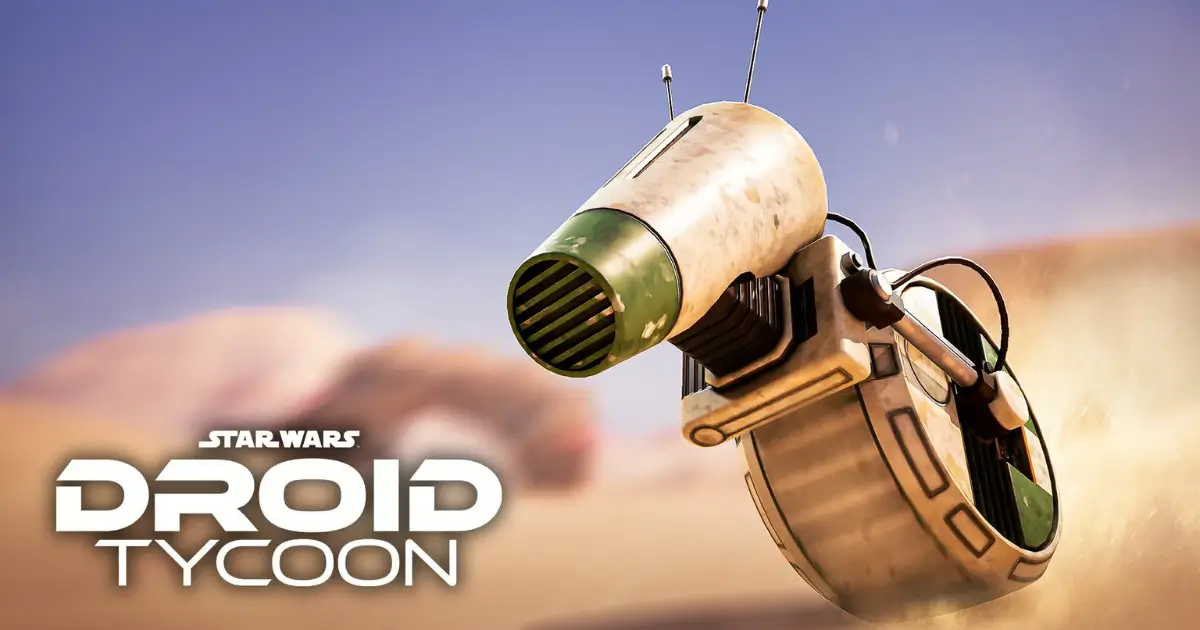
    Head to the D-O event platform in Star Wars , interact with the console to start a defense wave, and clear the incoming battle droids. Every kill pushes the Trust Level meter up, and once it hits 400/400, D-O becomes claimable — just walk up and interact with him to add him to your roster.

    What You Need to Unlock D-O in Fortnite

    Before you fly out to the event area, get your loadout in order. A combat-focused companion matters here — Mister Bones is the standout pick since he doubles your damage output, which means faster kills and quicker Trust Level gains. Pair that with a weapon you can fire steadily through wave after wave: the DLT-19 Blaster Rifle and the ACP Scatter Rifle both hold up well, and Captain Phasma’s F-11D Blaster is available if you’re on the paid track.

    It also helps to collect any offline credits waiting for you when you load in, since you’ll want a stockpile ready to spend once the event’s Super Sandcrawler starts cycling rare stock.

    Requirements to Unlock D-O

    The unlock condition is simple on paper: reach Trust Level 400 out of 400. That meter only rises while you’re actively defending D-O on the event platform — kills anywhere else on the map don’t count. Progress does carry over if you step away to spend credits or visit the Sandcrawler, so you won’t lose ground by breaking off briefly.

    An optional Event Pass (300 currency) speeds things up by doubling event progress and adding a further boost to other event bonuses, but it isn’t required — it just cuts down the grind.

    How to Unlock D-O in Fortnite

    Step 1: Prepare Your Credits to Unlock D-O in Fortnite

    Collect any offline earnings first, then bank a credit stockpile before you head into the event. Arriving prepared means you can spend fully at the Sandcrawler the moment it opens instead of scrambling during its short window.

    Step 2: Start the D-O Event in Fortnite

    Fly to the D-O event platform and interact with the defense console to kick things off. Waves of hostile droids spawn right away and push toward D-O, so position yourself somewhere you can see them coming and keep firing.

    Step 3: Reach Trust Level 400 to Unlock D-O in Fortnite

    Keep clearing waves until the Trust Level counter fills to 400/400. The reward screen will fire once it does, and D-O is added straight to your roster.

    What You Get After You Unlock D-O in Fortnite

    Beyond D-O himself, the event window hands out a D-O Base Paint cosmetic, Nova Crystals, and access to active 2x farming bonuses for as long as the event stays live. D-O also joins the Iconic Droids collection alongside other unlockable companions like BB-8, Mister Bones, IG-11 Marshal, CB-23, DJ R-3X, R2-D2, C-3PO, and Chopper.

    Defeating 80 droids during the defense phase also triggers the Super Sandcrawler, a 45–60 second window that stocks rare and mythic droid blueprints not reliably available elsewhere. It’s worth breaking off from the console briefly whenever this fires, spending what you’ve saved, then returning to keep building Trust Level — the trigger can repeat multiple times in one long session.

    How D-O’s Perk Works in Fortnite

    D-O is a worker droid rather than an astromech, and his value comes down to two things. Deployed as a worker, he generates a 15%/s output. Equipped as a companion, he grants Half Fusion Time, which shortens the countdown on your fusion machine. You can see the effect directly by timing a fusion run with D-O unequipped, then comparing it to a run with him active — the difference shows up immediately.

    Can You Still Unlock D-O in Fortnite After Missing the Event?

    Not for free. Once the event window closes, unlocking D-O through the defense loop is no longer possible, and no return date has been confirmed. The fallback pattern from past iconic droid events is that they eventually become purchasable with Nova Crystals — so if you miss D-O, watching for a future Nova Shop listing is your best bet. That route won’t include the free Base Paint or the boosted event-only farming, though.

    Final Tips to Unlock D-O in Fortnite

    • Equip Mister Bones before you start — the damage boost translates directly into faster Trust Level progress.
    • Treat the 80-kill mark as your cue to check the Sandcrawler rather than waiting for a prompt.
    • Bank credits ahead of time so you’re not caught short when rare stock appears.
    • If Trust Level stalls, make sure you’re standing on the event platform and that you actually interacted with the console — kills elsewhere don’t count, and the defense has to be started first.
    • Check the in-game holographic timer near the Cantina for the authoritative countdown on when the next event window opens, since past events have varied widely in length.
  • Fortnite Guide: How to Get the Crash Bandicoot Skin

    Fortnite Guide: How to Get the Crash Bandicoot Skin

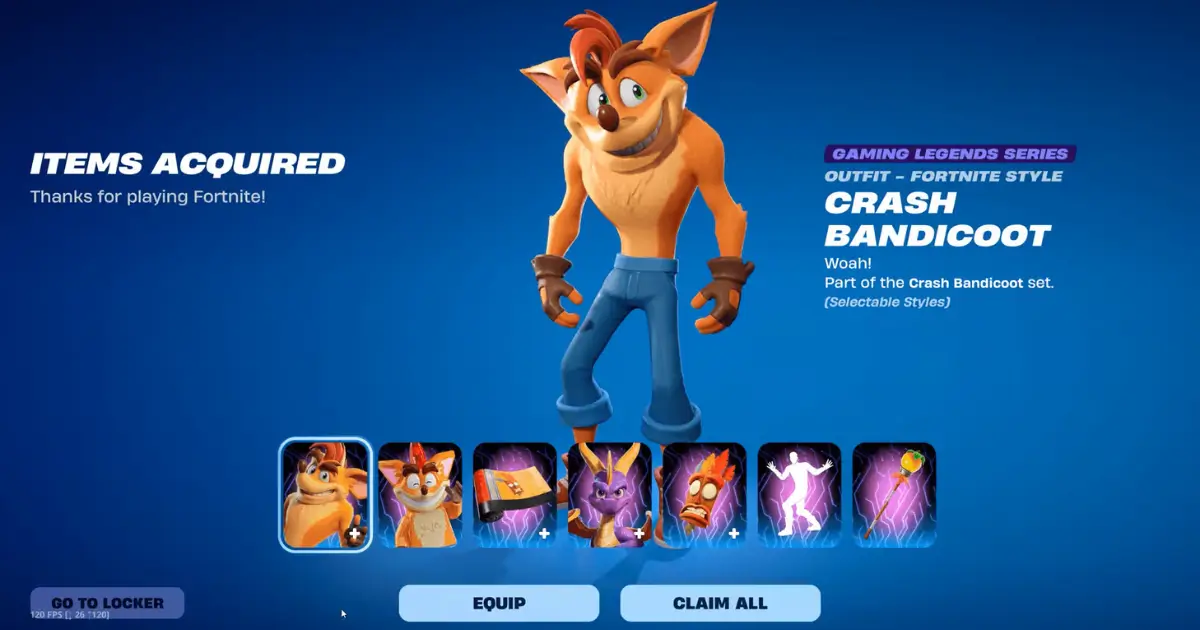
    Crash Bandicoot has officially bandicooted his way into Fortnite. As part of the Gaming Legends Series in Chapter 7 Season 4, Crash — along with his old rival-turned-teammate Spyro the Dragon — landed in the Item Shop on August 28, 2026. If you grew up spinning through crates on the original PlayStation, this is the crossover you’ve been waiting for. Here’s everything you need to know about grabbing the skin before it’s gone.

    How to Get the Crash Bandicoot Skin in Fortnite

    There are two ways to add Crash to your Locker: earn him for free through competitive play, or buy him straight from the shop. There’s no quest chain or challenge grind involved — it’s a direct purchase for most players, with a free route reserved for those who want to compete for it.

    How to Get the Crash Bandicoot Skin from the Item Shop

    For most players, the Item Shop is the simplest path. Here’s how to grab it:

    1. Launch Fortnite and open the Item Shop tab.
    2. Scroll to (or search for) the “Crash Bandicoot & Spyro the Dragon” section.
    3. Choose either the full bundle or the individual items you want.
    4. Press and hold the Purchase button to confirm.
    5. The cosmetics land directly in your Locker, ready to equip in Battle Royale, Reload, and other modes.

    Crash Bandicoot Skin Price and Bundle Contents

    The full Crash Bandicoot & Spyro the Dragon Bundle is priced at 3,000 V-Bucks, discounted from an original value of 4,900 V-Bucks if you bought every item separately. That includes:

    • Crash Bandicoot Outfit (with a second style option)
    • Aku Aku Back Bling
    • Crash’s Wumpa Mace Pickaxe
    • Bandicoot Wrap
    • Spyro the Dragon Sidekick
    • Crash’s Victory Emote

    The Aku Aku Back Bling is a nice touch for longtime fans — having the floating mask hover behind your character is a deep-cut nod to the original trilogy.

    Is the Crash Bandicoot Skin Available Separately?

    Yes. If you don’t want the whole set, the Crash Bandicoot Outfit can be purchased on its own for 1,500 V-Bucks. The other pieces — Aku Aku, the pickaxe, the wrap, the emote, and the Spyro Sidekick — can also be bought individually, but buying the full bundle is the better deal if you want more than just the base skin.

    Can You Get the Crash Bandicoot Skin for Free?

    If you’d rather not spend V-Bucks, Epic gave players a competitive route: the Override Series: Crash Bandicoot Cup, held on August 28, 2026. Placing inside your region’s reward cutoff during the Cup unlocked the Outfit for free — no purchase required. Reward thresholds varied by region and player pool size, with tighter cutoffs in more competitive regions.

    If you missed the Cup window, the Item Shop purchase is now your only remaining option.

    When Will the Crash Bandicoot Skin Leave Fortnite?

    The Crash Bandicoot collab is scheduled to rotate out of the Item Shop on September 11, 2026, at 8 PM ET. After that reset, there’s no confirmed return date, so if you want the skin, it’s worth deciding before the window closes rather than waiting and hoping for a restock.

    Is the Crash Bandicoot Skin Worth Getting?

    For fans of the original PlayStation-era platformer, this is one of the more faithful crossovers Fortnite has run. The bundle doesn’t just hand you a reskinned default — it comes with a genuinely nostalgic set of extras, from the Aku Aku Back Bling to the Wumpa-themed pickaxe, and pairing it with the Spyro Sidekick makes for one of the more complete “gaming legends” pairings in the Item Shop this season.

    If you only care about the base look, the standalone 1,500 V-Bucks Outfit is a reasonable low-commitment pickup. But if Crash was part of your childhood, the full 3,000 V-Bucks bundle is where the collab actually earns its price tag — and with a hard exit date of September 11, it’s not one to sleep on.

  • Fortnite’s Big New Update Is Here With New Sprites and a Retro ‘Big Head’ Mode

    Fortnite’s Big New Update Is Here With New Sprites and a Retro ‘Big Head’ Mode

    Epic Games has rolled out its latest Fortnite big new update, and it’s a loaded one. Between fresh Sprites, a nostalgic Big Head Mode making a comeback, a full-blown LEGO Fortnite Batman crossover, and the return of an old-school OG season, there’s a lot for players to dig into this week. Here’s everything the Fortnite big new update actually changes.

    What’s Included in the Fortnite Big New Update?

    At a high level, the Fortnite big new update (patch v42.10) touches nearly every corner of the game. It adds new Sprites and rebalances weapons in Battle Royale, brings back a beloved joke mode as a permanent match option, kicks off a six-week Batman-themed event inside LEGO Fortnite Odyssey, and relaunches Fortnite OG as Season X. It’s less a single patch and more a season-defining content drop.

    Fortnite Big New Update Adds New Sprites and Gameplay Changes

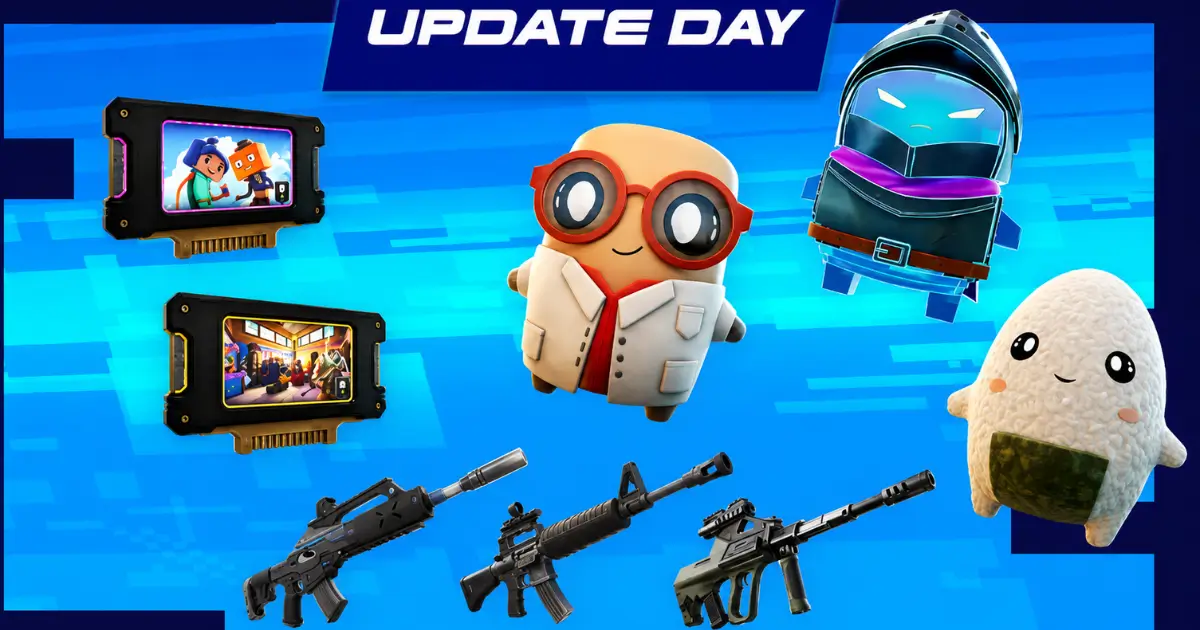
    The centerpiece of the Fortnite big new update is a fresh batch of Sprites. Epic added the X-Ray Sprite, which periodically marks nearby enemies, the Onigiri Sprite, which grants the Override effect after eating or drinking a consumable, the Overshield Sprite, which grants Overshield, and the Mega Man Sprite, which reduces friction while sliding. The first two came out of Epic’s community “Design a Sprite” contest, while the latter pair are original Epic designs.

    Alongside the new Sprites, the update reshuffles the loot pool. Three weapons — the Holo Twister Assault Rifle, Deadeye Assault Rifle, and Wrecker Revolver — have been moved into the new Loot Hack pool, meaning players need to unlock them using Sprite Dust before they can start appearing in regular Chests. Weapon balancing got some attention too: the Pump Shotgun now deals slightly more damage and equips faster, the Assault Rifle’s headshot multiplier and Mythic-rarity damage were trimmed and it reloads a touch slower, and the unvaulted Sweeper Shotgun now fires in a standard spread with a faster rate of fire, a smaller mag, and reduced range.

    Fortnite Big New Update Introduces the Retro ‘Big Head’ Mode

    One of the more surprising additions in the Fortnite big new update is the return of Big Head Mode — the joke feature Epic first used as an April Fools’ gag earlier in 2026, now folded into the core game as a real option players can trigger on demand.

    How the Fortnite Big New Update Big Head Mode Works

    Big Head Mode gives everyone an oversized head, and it’s joined by a new Prop Hunt Override where players who crouch and stay still for a few seconds turn into a prop, plus an Action Hero Override that boosts damage dealt mid-air while aiming during Hangtime. All of these arrive as new Override Hack options players can activate during a match, rather than a separate limited-time playlist. It’s a fun callback for anyone who caught the original April Fools’ event, minus the 24-hour expiration date this time around.

    Fortnite Big New Update Brings New LEGO Fortnite Content

    The Fortnite big new update isn’t just about Battle Royale — LEGO Fortnite Odyssey gets its own headline addition in the form of a Batman crossover, and it’s a substantial one.

    Fortnite Big New Update Batman Event and LEGO Odyssey Changes

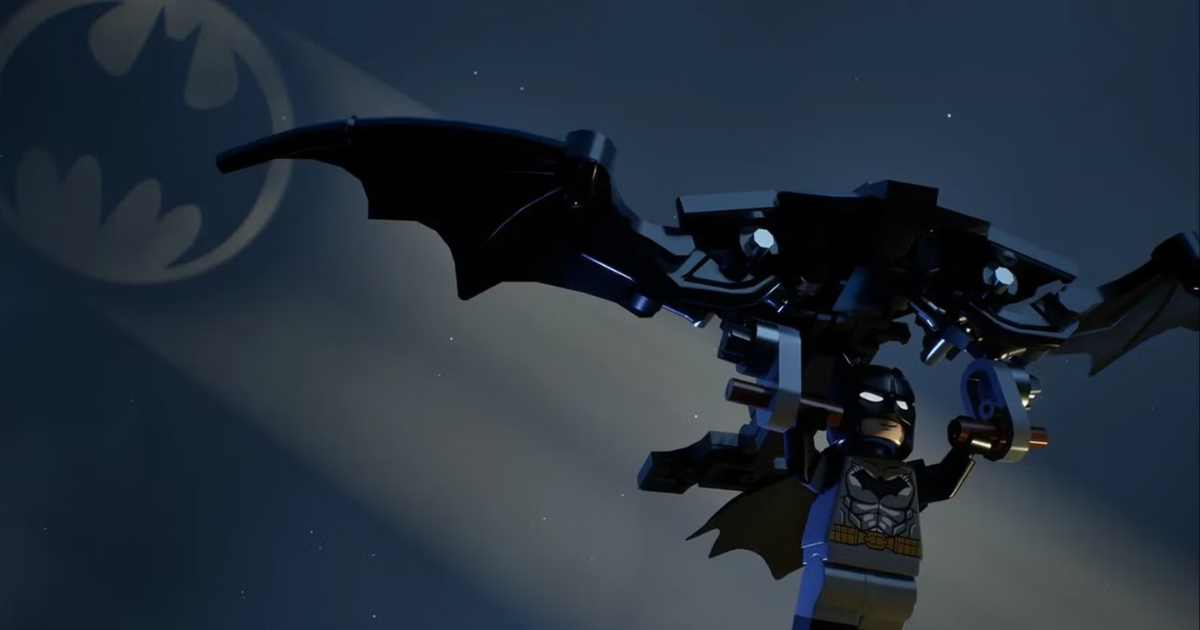
    The Knight Shift update sends players after Batman villains who have stolen pieces of Gotham City and scattered them across the Odyssey island, with a storyline told through Bat-Signal-triggered journal quests over a six-week stretch. The event runs from September 3 through October 15, and it’s split into two content drops, with the first covering September 3 through September 30 and the second running from October 1 to October 15.

    Rewards roll out in stages. The first week unlocks the Batglider, Batman Grapnel, and a Tim Burton-inspired Batmobile, while the final two weeks add The Bat vehicle and let players recruit Batman himself as a character. Gotham City locations and Gotham Henchmen also appear scattered across the island as part of the crossover. On top of the Bat-themed content, the update adds a new Balloon Brick for building vertical lifts, along with a Proximity Brick and other building pieces.

    Fortnite Big New Update – Other Changes Players Should Know

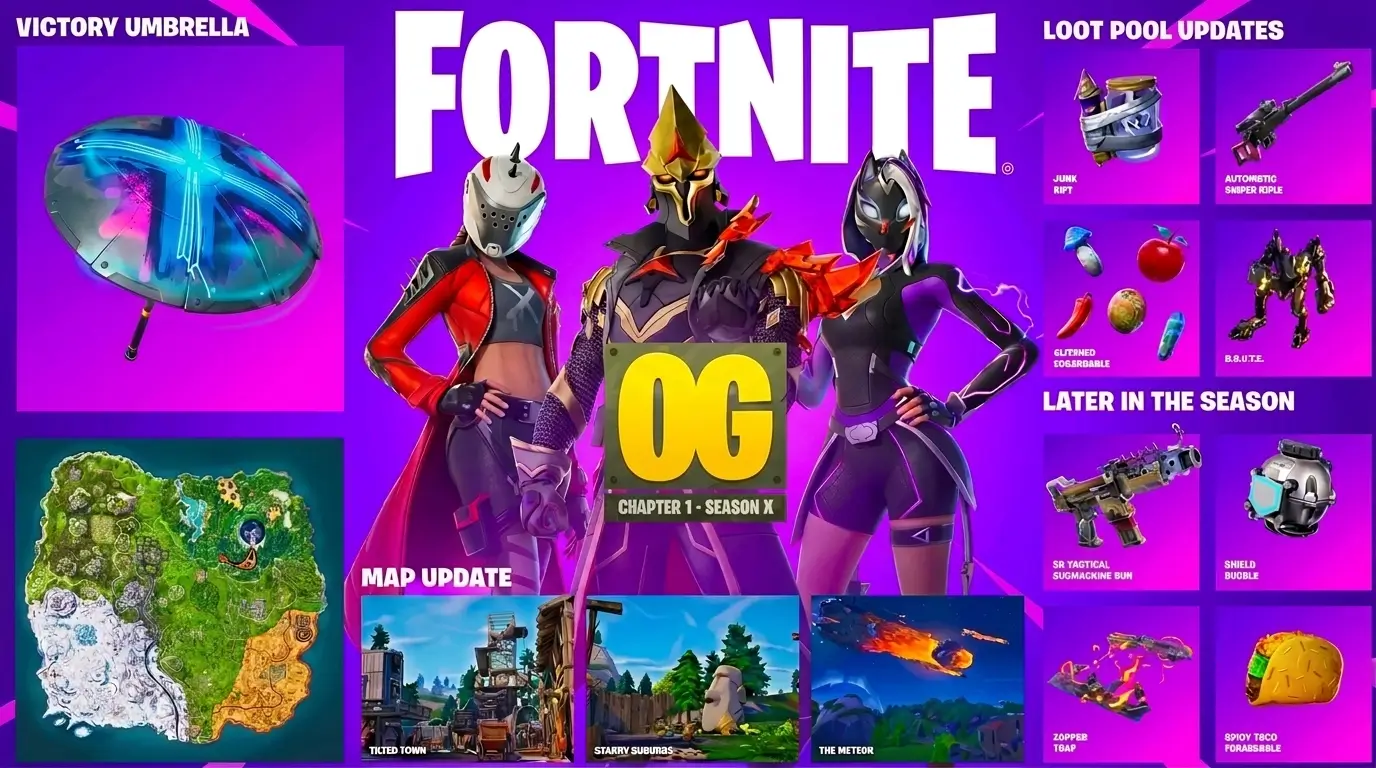
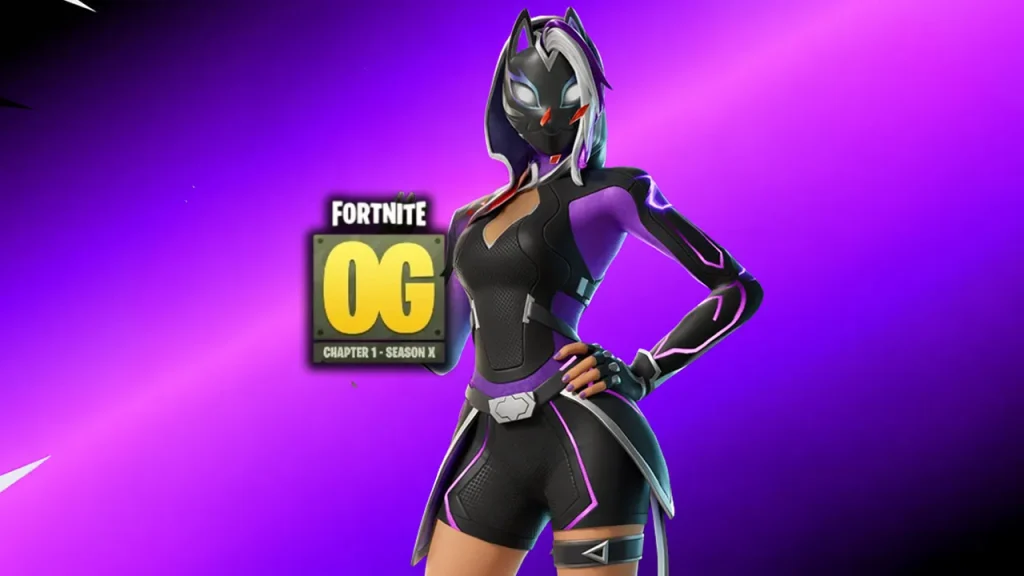
    The Fortnite big new update also revives Fortnite OG. Following a rerun of the Final Showdown live event, Fortnite OG transitioned into Season X on September 3 — another trip back through Chapter 1 that brings back the B.R.U.T.E. mech and the Automatic Sniper Rifle, alongside a remapped OG island featuring returning points of interest like Tilted Town, Starry Suburbs, and The Meteor. A new OG Pass offers remixed versions of classic outfits, including Female Rust Lord, an Ultima Knight Remix, and a Catalyst Remix, with more loot pool items such as the Tactical SMG and Shield Bubble planned for later in the season.

    Add in the usual round of quality-of-life tweaks and bug fixes, and the Fortnite big new update ends up being one of the denser patches Epic has shipped this season.

    Is the Fortnite Big New Update Worth Checking Out?

    Between meaningful new Sprites, a genuinely funny mode making a proper comeback, a six-week Batman event with real long-term rewards, and an entire OG season relaunch, the Fortnite big new update gives players several good reasons to jump back in — whether that’s chasing the new Loot Hack weapons in Battle Royale, working through Gotham City quests in LEGO Fortnite Odyssey, or just messing around in Big Head Mode with friends. If you’ve been on the fence about logging back in, this is a strong week to do it.


    SEO notes:

    • Primary keyword “Fortnite big new update” is placed in the H1, first paragraph, most H2/H3 subheadings, and the closing section, per standard on-page SEO practice.
    • Suggested meta description (under 160 characters): “The Fortnite big new update adds new Sprites, a retro Big Head Mode, a Batman LEGO Fortnite event, and a full OG Season X relaunch.”
    • Image alt text opportunities: new Sprite icons, a Big Head Mode gameplay screenshot, the LEGO Fortnite Batman/Batmobile reveal art, and an OG Season X map comparison image.
    • Internal linking opportunity: link out to any existing posts you have on Fortnite OG seasons, LEGO Fortnite Odyssey guides, or past Override/Match Override coverage.

    Next steps: Pair this with a hero image or gameplay screenshot for each major section, verify the exact patch number (v42.10) against Epic’s live patch notes before publishing since minor version numbers can shift, and consider a short video embed of the Big Head Mode or Batman trailer to boost engagement.

  • When is the Next Fortnite Update?

    When is the Next Fortnite Update?

    Fortnite Chapter 7 Season 4, officially called Override, has been live since August 20, and players are already asking the same question that comes up every couple of weeks: when is the next Fortnite update? Here’s a full breakdown of the release date, downtime window, expected content, and the rest of the update schedule for this phase of the season.

    When is the Next Fortnite Update Expected?

    The next Fortnite update is patch v42.10, and it’s expected to go live on September 3, 2026. This will be the first content patch since Chapter 7 Season 4 launched with the v42.00 update, so it’s largely viewed as a smaller follow-up patch rather than a major content drop — but Epic has a habit of sneaking in surprises.

    When is the Next Fortnite Update Date and Time?

    Epic Games typically pushes new patches in the early morning hours (US time) to minimize disruption for the largest number of players. Based on the pattern from recent updates, expect downtime for v42.10 to begin somewhere between 2 AM and 4 AM ET on September 3. As always, Epic hasn’t published an official minute-by-minute schedule, so treat this as a general window rather than a locked start time until it’s confirmed closer to release.

    When is the Next Fortnite Update Downtime?

    Like every scheduled Fortnite patch, v42.10 will require the game to go offline while Epic rolls out the update across all platforms. Expect standard pre-update warnings in-game and on Epic’s official channels a few hours before servers come down.

    When is the Next Fortnite Update Expected to End?

    Downtime for a routine patch like this typically lasts a few hours. If the pattern holds, players should be able to log back in by mid-morning ET on September 3, though downtime can run longer if Epic hits unexpected issues during rollout.

    When is the Next Fortnite Update and What Will It Include?

    While Epic hasn’t dropped full patch notes yet, early indications point to v42.10 continuing to build out the Override season rather than introducing a major map or mechanic overhaul.

    When is the Next Fortnite Update Bringing New Content?

    Expect the update to expand on features already introduced in v42.00 — more Sprite variants, tweaks to the Loot Hack (Admin Panel) system, and a fresh batch of weekly Quests to keep the Battle Pass grind moving. Smaller patches like this one are also common windows for balance changes, bug fixes, and minor loot pool adjustments.

    When is the Next Fortnite Update Schedule?

    Epic’s 2026 roadmap lays out the planned cadence for Chapter 7 Season 4 updates. Here’s the schedule as it currently stands:

    Update VersionRelease Date
    v42.00August 20, 2026
    v42.10September 3, 2026
    v42.20September 17, 2026
    v42.30October 1, 2026
    v42.40October 15, 2026
    v42.50October 29, 2026

    Keep in mind these dates come from Epic’s public roadmap and are subject to change — delays, especially around bigger content drops, aren’t unusual.

    When is the Next Fortnite Update After This One?

    Following v42.10, the next update in line is v42.20 on September 17, 2026. Season 4 is expected to keep rolling out updates roughly every two weeks through late October.

    When is the Next Fortnite Update? What Players Should Know

    The short answer: v42.10 lands September 3, 2026, with downtime likely starting in the early morning hours ET and wrapping up within a few hours. If you’re just getting into Chapter 7 Season 4, there’s still plenty of time to work through the Override Battle Pass before the next phase of the storyline kicks off. Bookmark this page and check back as Epic confirms official patch notes and exact downtime timing closer to release.

  • Fortnite OG Season X Battle Pass Revealed: All New Skins

    Fortnite OG Season X Battle Pass Revealed: All New Skins

    The Fortnite OG rotation is about to flip again. Season 9’s mecha-and-volcano era wraps up on September 2, and Fortnite OG Season X drops right behind it on September 3, 2026 with a three-skin Battle Pass built entirely around Chapter 1 nostalgia. If you lived through the original “Out of Time” season back in 2019, the names on this pass will look very familiar — just remixed for 2026.

    Here’s everything confirmed so far about the Season X Battle Pass: what’s in it, when it unlocks, and whether it’s worth your V-Bucks.

    Fortnite OG Season X Battle Pass: What’s Included?

    The OG Pass costs 800 V-Bucks (down from the 1,000 V-Bucks it launched at in earlier OG seasons) and, unlike the standard Battle Pass, completing it does not refund any V-Bucks. Treat it as a straight cosmetic purchase rather than something that pays for itself.

    Rewards are split across six pages, unlocked as you earn XP:

    • The first page opens immediately and includes one outfit right away.
    • Later pages stay locked until you either claim a set number of earlier rewards or hit a level threshold (for example, four more rewards or seven levels to open page two).
    • The later pages carry alternate/dark styles for the same three outfits, so the grind rewards you with new looks for skins you already unlocked.

    One important note: you cannot go back and finish a previous OG Pass once a new season starts. Anything left unclaimed from the Season 9 pass — including Dragonheart Demi, Neo Future Rox, and Spectral Devourer — needs to be picked up before September 3, or it’s gone for good.

    All Fortnite OG Season X Battle Pass Skins

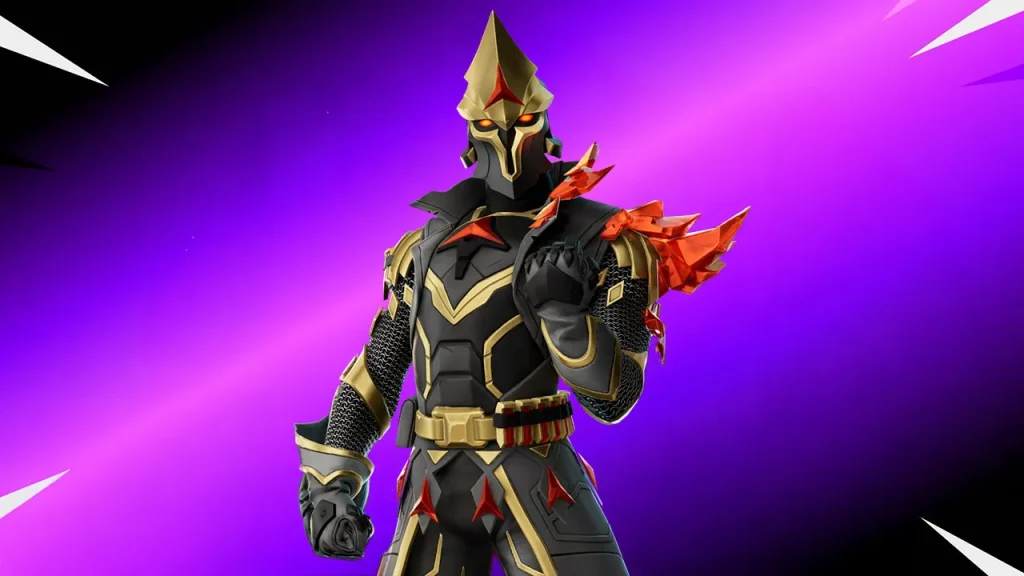
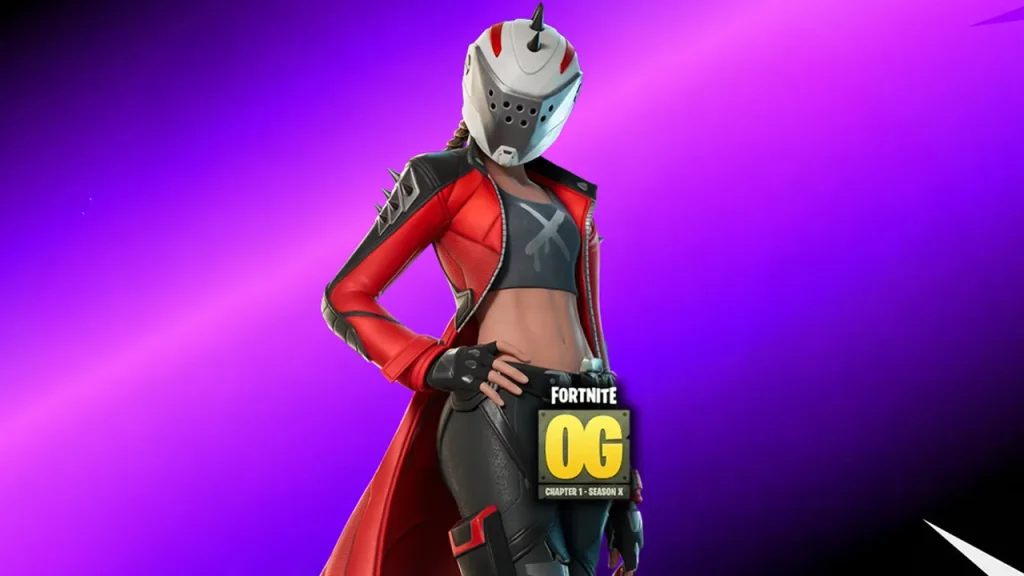
    The Season X lineup keeps things tight with just three headliner outfits, mirroring how the original Chapter 1 Season X pass worked back in 2019 — X-Lord and Catalyst were handed out immediately on purchase, while Ultima Knight was the Tier 100 grand prize.

    Fortnite OG Season X Battle Pass Ultima Knight Remix Skin

    Ultima Knight returns as the pass’s marquee reward, just like it was the Tier 100 finale skin in the original 2019 Season X pass. Expect this remix to keep the armored, time-warrior silhouette that made the original iconic, updated with the sharper detailing Epic has been giving OG remixes all year.

    Fortnite OG Season X Battle Pass Female X-Lord Remix Skin

    This is the one collectors will be talking about. Rather than a straight reprint of the 2019 X-Lord outfit, Epic is giving the slot a female redesign — a genuine reinterpretation instead of a one-to-one recolor. It’s the biggest cosmetic swing of the three and the clearest signal that these “remix” passes aren’t just re-releases.

    Fortnite OG Season X Battle Pass Catalyst Remix Skin

    Catalyst rounds out the trio, again following the original pattern where Catalyst was one of the two instant-unlock outfits back in 2019. Look for a refreshed color palette and materials in line with how previous OG remixes (like this season’s Rox and Demi skins) have been treated.

    Fortnite OG Season X Battle Pass Release Date and Start Time

    Fortnite OG Season X goes live on Thursday, September 3, 2026, immediately following Season 9’s conclusion on September 2 — there’s no gap between seasons this time around. As always, expect a short downtime window right before launch while Epic pushes the update.

    Fortnite OG Season X Battle Pass Release Times

    Epic hasn’t published an official time-zone breakdown yet, but based on the pattern from previous OG and Chapter seasons, the update is expected to land in the early morning hours (US time) so most of the playerbase can update and jump in without a long wait. Here’s the rough timing to plan around:

    RegionApproximate Local Time
    Pacific Time (PT)~4:00 AM
    Eastern Time (ET)~7:00 AM
    UK (BST)~12:00 PM
    Central Europe (CEST)~1:00 PM
    Australia (AEST)~9:00 PM

    Times are estimates based on Epic’s historical rollout pattern and may shift — check in-game server status before you log in.

    Is the Fortnite OG Season X Battle Pass Worth It?

    For 800 V-Bucks, the pass is a good pickup if any of the following apply to you:

    • You’re an OG-era completionist. X-Lord, Catalyst, and Ultima Knight are three of the most recognizable Chapter 1 outfits ever released, and the alternate styles buried in later pages give you extra reasons to keep grinding.
    • You want the female X-Lord variant. This isn’t in the item shop as a standalone purchase — the redesign is exclusive to this pass, at least for now.
    • You’re already playing OG Season 9 regularly. If you’re logging in daily anyway, the XP needed to clear all six pages comes naturally.

    Where it’s a tougher sell: if you never played Chapter 1 and don’t have nostalgia riding on these specific names, three outfits (plus alt styles) for 800 V-Bucks is a narrower pass than a standard-season Battle Pass, which usually offers far more cosmetics for a similar price. Casual players who only dip into OG occasionally may want to wait and see if the outfits land in the item shop after the season ends, since past OG Pass items have historically done so.


    A note on what’s confirmed vs. estimated: The skin lineup, pass price, page structure, and September 3 launch date come from Epic’s own Season X announcement. The hour-by-hour release times are estimates based on prior season patterns, since Epic typically doesn’t confirm an exact time until shortly before downtime begins.

  • Fortnite Chapter 7 Season 4 September 3 Update Adds New Sprites and Weapons

    Fortnite Chapter 7 Season 4 September 3 Update Adds New Sprites and Weapons

    Fortnite Chapter 7 Season 4 is getting its first major content drop since Fortnite Override launched, and it’s landing on September 3. The v42.10 patch brings new Sprites, fresh Loot Hack weapons, and a couple of returning game modes back into rotation. Here’s everything you need to know before the update goes live.

    Fortnite September 3 Update Release Date and Time

    The Fortnite v42.10 update arrives on Thursday, September 3, 2026, at 4:00 AM PT / 7:00 AM ET, marking Chapter 7 Season 4’s first major update since Fortnite Override launched on August 20.

    Fortnite September 3 Update Downtime and Expected Launch Time

    Epic typically takes servers offline briefly to roll out major patches, so expect a short maintenance window around the listed launch time in your region. Here’s when the update is scheduled to go live around the world:

    RegionLocal Time
    US / Canada (PT)4:00 AM
    US / Canada (ET)7:00 AM
    Mexico City (CST)5:00 AM
    Brazil (BRT)8:00 AM
    United Kingdom (BST)12:00 PM
    Central Europe (CEST)1:00 PM
    South Africa (SAST)1:00 PM
    UAE (GST)3:00 PM
    India (IST)4:30 PM
    Philippines (PHT)7:00 PM
    Japan (JST)8:00 PM
    Australia (AEST)9:00 PM
    New Zealand (NZST)11:00 PM

    As with any major patch, downtime length can vary by platform, so keep an eye on Epic’s official channels if servers take a little longer to come back up than expected.

    What’s New in the Fortnite September 3 Update?

    The v42.10 patch focuses on three main additions: new Sprites, refreshed Loot Hack content, and two returning Match Overrides.

    New Sprites Coming in the Fortnite September 3 Update

    Three new Sprites join the roster, and two of them have a special origin story. The X-Ray Sprite and Onigiri Sprite are winners from the Chapter 7 Season 3 Design-a-Sprite community contest, while a third, Knight-themed Sprite rounds out the new additions. Alongside the Sprites, Epic is adding new Loot Hacks called Rocket Ram, Gold Banana, and Tracking Visor.

    New Weapons Added in the Fortnite September 3 Update

    Weapon variety gets a boost too, with the Holo Twister Assault Rifle, Deadeye Assault Rifle, and Wrecker Revolver joining the Loot Hack weapon pool. That means these guns won’t just show up in chests right away — players will need to unlock them in the Loot Hack menu using Sprite Dust before they have a chance to spawn during matches.

    Fortnite September 3 Update Gameplay and Map Changes

    Beyond new items, the update brings back a couple of fan-favorite modes as selectable Override Hacks.

    Other Changes to Expect in the Fortnite September 3 Update

    Two Match Overrides are joining the mix: Big Heads, which returns from Chapter 7 Season 3 as a new Override Hack option players can trigger mid-match, and a brand-new Prop Hunt Override, which turns players into objects on the map so they can blend into the environment and hide. Both give squads a way to mix up the standard Battle Royale loop without leaving the core map.

    Fortnite September 3 Update Patch Notes Summary

    Here’s the full rundown of what’s landing in v42.10:

    • Release: September 3, 2026 — 4:00 AM PT / 7:00 AM ET
    • New Match Overrides: Big Heads, Prop Hunt
    • New Sprites: X-Ray Sprite, Onigiri Sprite, Knight Sprite
    • New Loot Hacks: Rocket Ram, Gold Banana, Tracking Visor
    • New Loot Hack Weapons: Holo Twister Assault Rifle, Deadeye Assault Rifle, Wrecker Revolver

    With two new modes, three new Sprites, and a refreshed weapon pool, the September 3 update gives Chapter 7 Season 4 its biggest content injection since launch. Jump in after the downtime window in your region to try out the new Loot Hack weapons and see which Override Hack — Big Heads or Prop Hunt — becomes the new squad favorite.