Looking for the latest Paint and SEEK! codes? This Roblox hide-and-seek game rewards players with free Coins (and the occasional Firework bundle) that you can redeem for cosmetics and extras. Below you’ll find every working code, step-by-step redemption instructions, and what to do if a code won’t apply.
Working Paint and SEEK! Codes
As of today, here are the active codes you can redeem:
| Code | Reward |
|---|---|
COLORINGBOOKS | 1,000 Coins |
FIREWORK | 100 Fireworks |
NEWUPDATE | 750 Coins |
6KTHANKYOU | 800 Coins |
THANKYOU5K | 700 Coins |
5MILVISITS | 1,100 Coins |
ThanksForSupport | 2,500 Coins (unconfirmed — try it and see) |
3MVISITS | Rewards (unconfirmed) |
Codes are typically case-sensitive, so type them exactly as shown or copy-paste them straight into the code box to avoid typos.
How to Redeem Paint and SEEK! Codes
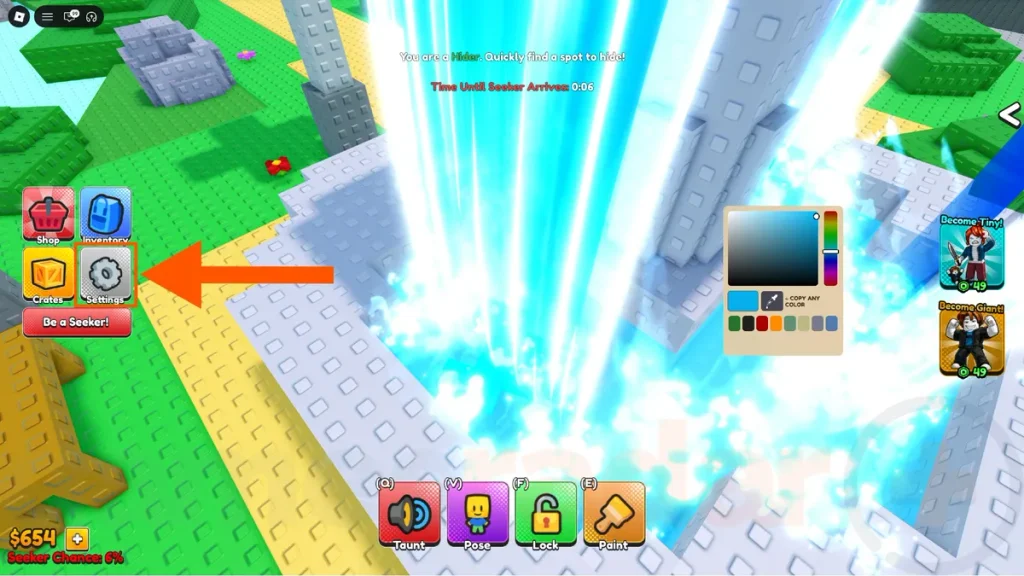
- Launch Paint and SEEK! on Roblox.
- Click the settings/gear icon in the top-right corner of the screen.
- Find the “Enter code…” text box.
- Paste or type in one of the active codes above.
- Click CLAIM to collect your reward.
If codes aren’t showing up correctly, try joining a fresh server before redeeming — some codes only apply cleanly on a new session.
Expired Paint and SEEK! Codes
There are currently no expired codes on record — every code released so far is still active. That’s unusual for a Roblox codes list, so expect this section to fill in as older codes eventually get phased out. Bookmark this page and check back for updates.
Why Are My Paint and SEEK! Codes Not Working?
If a code won’t redeem, run through this checklist:
- Check your spelling. Codes are case-sensitive — copy-paste them rather than typing them from memory.
- Make sure the code is still active. Developers occasionally retire codes without much notice; refer back to the working list above.
- Join a new server. Some codes fail to register on a session that’s been running a while — rejoining the game often resolves it.
- Confirm you’re in the right menu. Codes are entered through the settings/gear icon, not a separate “codes” button — using the wrong menu is a common mistake.
- Watch for extra spaces. A stray space before or after a code (easy to pick up when copying from some sites) will cause it to fail.
Still stuck? New codes tend to arrive alongside game updates and milestones, so following the developer’s official channels is the best way to catch fresh ones as soon as they drop.
Codes verified as of September 6, 2026. Availability and rewards may change — always double-check before redeeming.
Leave a Reply